Webhooks
Before you get into webhooks, make sure you check out our getting started guide.
Anvil can POST to an endpoint on your server with a webhook. Webhooks allow you to respond to actions taken by your users such as when a signer has finished signing, or when a user has completed filling a Webform. Webhooks can be setup at the organization level or on a per-object basis.
If you plan on embedding e-signatures or Workflows in an iframe element, you may find iframe events to be an alternative to webhooks in some cases. See the e-sign iframe events and Workflow iframe events documentation for more details.
Enabling webhooks
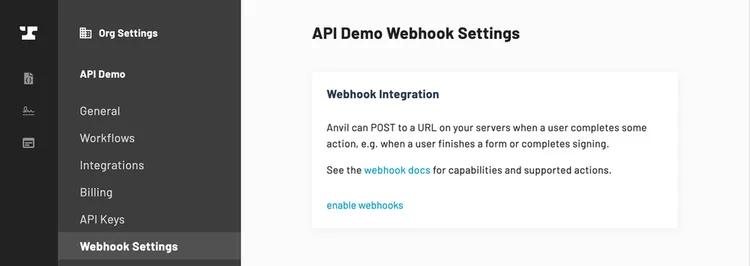
Enable webhooks on your Organization Settings -> Webhook settings page. You do not need to set a static URL if you plan to only use per-object webhook URLs.
Webhooks to localhost and to development tunnel URLs are restricted. See local development webhooks if you are building your handler on your own machine.
Handling a webhook
When an action happens on Anvil's side, Anvil will POST JSON to the URL you specify (either static or per-object). The payload will look like the following:
{
  action: 'actionName',
  token: '38Gp2vP47zdj2WbP1sWdkO2pA7ySmjBk',
  data: 'RIaPFMKCP1Lqf8djqhG0uiN3UvrqQ5HgLxTBnigvSoQGwUeeRu...',
}
actionis the name of the action that happened.tokenis generated when you enable webhooks on yourOrganization Settingspage. It is a way for your server to make sure Anvil is making the request. Treat this as you would an API key. It is up to you to check that these match in your webhook handler.datais the actual payload of the webhook. It is encrypted with your organization's RSA key if you choose to create a keypair. Create a keypair on yourOrganization Settings->API Settingspage. If no keypair exists,datawill be sent as unencrypted JSON.- See our notes on encryption for information on creating a keypair and using it to decrypt data.
Response & Retries
Your server should respond to the POST with a 204 No Content or 200 OK status code. Anvil will ignore the response body.
If your server responds with a status code >= 400 or times out, Anvil will consider the call a failure and the request will be retried. It will attempt a total of 5 times.
The webhook will be retried in these rough intervals until it sees a successful code or gives up:
Immediately, 5 seconds, 1 min, 3 min, 7 min (i.e. the last call will happen about 11 min from initial call)
Setting up Webhooks
There are three ways to register your webhooks and subscribe to events.
- A global URL at the Organization level. When you enable webhooks in your Organization, you can specify a URL. This URL will receive all webhook messages for all supported events.
- Set an object-specific
webhookURLwhen creating or updating an object in the system. This URL will receive webhook messages for all events on the specific object. If you have both a global URL set and an object-specific URL set, the object-specific URL will override the static URL. - Use Webhoook Actions to register a URL to subscribe to specific (or all) supported events on a specific (or all) supported objects.
Per-Object Webhook URLs
EtchPacket Webhook URL
// The webhookURL will receive all webhooks on related
// objects. e.g. etchPacketComplete and signerComplete on
// the packet's signers.
createEtchPacket({
  ...,
  webhookURL: 'https://specific.com/url',
  ...
})
updateEtchPacket({
  eid: '...',
  webhookURL: 'https://specific.com/url',
  ...
})
WeldData Webhook URL
// The webhookURL will receive all webhooks on related
// objects. e.g. weldComplete and signerComplete on the
// weldData's signers
forgeSubmit({
  weldDataEid: null,
  webhookURL: 'https://specific.com/url',
  ...
})
createWeldData({
  weldEid: '...',
  webhookURL: 'https://specific.com/url',
  ...
})
updateWeldData({
  eid: '...',
  webhookURL: 'https://specific.com/url',
  ...
})
Webhook Actions
Webhook Actions are Anvil's system for subscribing to specific (or all) supported events on specific (or all) supported objects in your Organization. These events will be delivered via Webhooks.
The idea is this: when an event you are interested in occurs on an object you are interested in, Anvil will let you know about it via Webhook.
In order to accomplish this, you need to determine 3 pieces of information:
- What action(s) are you interested in monitoring for?
- What object(s) are you interested in monitoring for those actions?
- Where would you like us to make the Webhook call when this occurs?
Then you will need to make a call to the createWebhookAction mutation with this information in order to set up your Webhook Action. Every time an event that satisfies your Webhook Action occurs, you will be notified via Webhook.
You can later disable your Webhook Action with the removeWebhookAction mutation.
Supported Actions
In order to subscribe to events occurring on objects, you'll need to decide what actions/events you're interested in. For example, weldComplete or signerComplete. More details of the supported actions can be found in the createWebhookAction mutation documentation or below in this documentation.
In addition to those specifc actions, you can subscribe to "all actions" by specifying *.
Supported Object Types
Once you know what action you'd like to monitor for, the next step is to choose what Object Type(s) you'd like to monitor for those actions on. Each action supports 1 or more Object Types that you can choose from for your Webhook Action. For example, the weldComplete action is supported on either Weld or WeldData object types. More details of the supported action + object type combinations can be found in the createWebhookAction mutation documentation.
In addition to those specifc object types, you can subscribe to "all object types" by specifying *.
Specifying an Object EID
For a given action and object type, you can monitor for them to occur on either:
- A specific instance of an object type. This is accomplished by providing the
eidof the specific object to theobjectEidargument. - All instances of an object type. This is accomplished by providing
*to theobjectEidargument.
Specifying the Webhook
The Webhook you'd like us to send events for your Webhook Action can be specified with a couple pieces of information:
- The
organizationEidwhere this Webhook Action should be created. - The
urlthat the Webhook Action should call when it is triggered.
See the createWebhookAction mutation documentation for more information.
Examples
Here are some examples of arguments for common scenarios.
Monitor a specific event on a specific object
{
  "action": "weldComplete",
  "objectType": "Weld",
  "objectEid": "CUwskmJ8cPh3mVFWVTPn",
  ...
}
Monitor a specific event on all objects of a particular type
{
  "action": "weldComplete",
  "objectType": "Weld",
  "objectEid": "*",
  ...
}
Monitor a specific event on any supported object for that event
{
  "action": "weldComplete",
  "objectType": "*",
  "objectEid": "*",
  ...
}
Monitor all events on a specific object
{
  "action": "*",
  "objectType": "Weld",
  "objectEid": "CUwskmJ8cPh3mVFWVTPn",
  ...
}
Monitor all events on all objects of a particular type
{
  "action": "*",
  "objectType": "Weld",
  "objectEid": "*",
  ...
}
Monitor all events on all objects of any type
{
  "action": "*",
  "objectType": "*",
  "objectEid": "*",
  ...
}
Local development webhooks
Anvil does not deliver webhooks to URLs on your own machine or to development tunnels by default. You can turn on development webhooks for your organization while you build your handler, but the setting expires at the end of the day and has to be turned on again.
What is restricted
Anvil treats two kinds of hostname as development targets and skips webhooks to them unless development webhooks are enabled on your organization:
- any hostname containing
localhostor127.0.0.1 - any hostname containing
ngrok, such asabc123.ngrok.ioorabc123.ngrok-free.app
Separately, and no matter what that setting says, Anvil never completes a webhook request to a private or internal address. A static webhook URL or Webhook Action URL whose hostname is itself a private address is rejected outright when you try to save it. Any other URL is checked again at connection time, after DNS resolution, so a public hostname that resolves into a private range is refused there instead.
Those two rules together mean localhost is not a useful webhook target for the hosted Anvil app. localhost from our servers refers to our servers, not to your machine, so the request has nowhere to go.
To receive real Anvil webhooks on a handler running locally, use a tunnel. A tunnel gives your local server a public hostname, so point one at your local port, enable development webhooks, and use the tunnel's https URL as your webhook URL.
Enabling development webhooks
On your Organization Settings -> Webhook settings page, use enable development webhooks. The setting is organization wide: it applies to your static URL, per-object webhook URLs, and Webhook Actions alike.
Enabling it stores an expiration timestamp set to midnight at the start of the next day in your local timezone. It therefore lasts for the remainder of the current day rather than a full 24 hours. Turn it on at 9am and you have most of a working day; turn it on at 11pm and you have about an hour. Once it expires, delivery to local and tunnel URLs stops until you enable it again.
What happens while it is off
Deliveries to those URLs are skipped rather than failed. Anvil makes no HTTP request, writes no webhook log entry, schedules no retry, and returns no error on the API call that triggered the event. Webhooks to ordinary public URLs are unaffected.
The Test Webhook button runs through the same check, so it will not reach a development URL either while the setting is off. If your tunnel is up and your handler is receiving nothing at all, check this setting before you start debugging your endpoint.
Why development webhooks expire daily
A tunnel is a public front door into a private machine. Our private-address protection cannot see that on its own: an ngrok hostname is public and resolves to ngrok's edge servers, not to anything on your network. The development webhooks setting is the only thing telling us that a given URL is somebody's laptop rather than a real endpoint. Leaving it on permanently would erase that distinction for your organization indefinitely, so we scope it to the working session it was meant for.
Tunnel hostnames are not permanently yours. The hostname is issued by the tunnel provider, not by you, and it can be reassigned once you stop using it. A standing allowance means a URL you set up months ago keeps sending your organization's payloads, which include signer names, email addresses, and document identifiers, to a hostname that may no longer point at your machine. Expiring the setting daily keeps that window short.
A development endpoint is not a production endpoint, and failures are not free. While development webhooks are on, calls to your tunnel run through the same delivery pipeline as production traffic, including the responses that retire a webhook. A 410 deactivates it immediately with no retries, and a 404 deactivates it once the retries are exhausted. Other failures, such as a 5xx or a timeout, are retried and leave the webhook active. A dead tunnel answering 404 is therefore enough to deactivate whichever webhook is pointed at it, and if that is your organization's static URL, live traffic stops until you notice. Expiring the setting daily bounds how long a forgotten development URL can sit there.
If you need a longer-lived test target, use a stable public URL you control, such as a staging server, rather than a tunnel to your laptop.
Test Actions
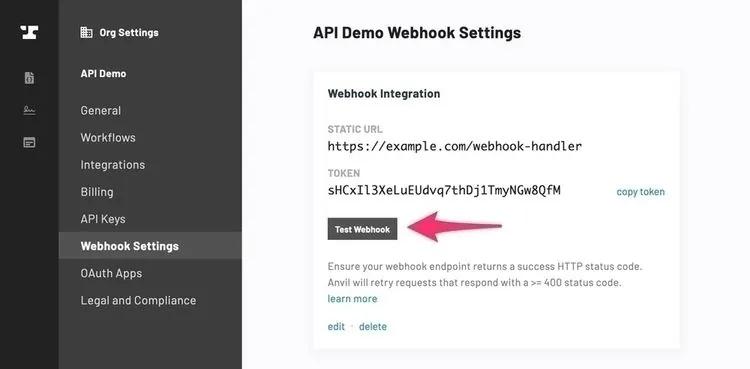
webhookTest
Called when the test button is clicked from the webhook settings UI. This is only available for static webhook URLs.
{
  action: 'webhookTest',
  data: {...},
  token: '38Gp2vP47zdj2WbP1sWdkO2pA7ySmjBk'
}
Workflow Actions
weldCreate
Called when a Workflow is created in the Workflow builder.
{
  action: 'weldCreate',
  data: 'RIaPFMKCP1Lqf8djqhG0uiN3UvrqQ5HgLxTBnigvSoQGwUeeRu...',
  token: '38Gp2vP47zdj2WbP1sWdkO2pA7ySmjBk'
}
Once decrypted, it will have the following structure:
{
  eid: 'KtHa4IhKyoZO6hbQaQJK', // new Weld eid
  name: 'New Office',
  slug: 'new-office',
  forges: [{
    eid: 'v9vlkzYU0e6IKpeYimIP',
    name: 'Virtual Office Setup'
    slug: 'new-office-admin'
  }, {
    eid: '0ZTRyrIlfcYsAo6A95Qk',
    name: 'Client Details',
    slug: 'new-office'
  }]
}
forgeComplete
When a single Webform within a Workflow is finished, it will call your webhook with the forgeComplete action.
Note: the forgeComplete action is called on both live and test submissions. There will be an weldData.isTest field in the payload indicating test vs live submissions.
{
  action: 'forgeComplete',
  data: 'RIaPFMKCP1Lqf8djqhG0uiN3UvrqQ5HgLxTBnigvSoQGwUeeRu...',
  token: '38Gp2vP47zdj2WbP1sWdkO2pA7ySmjBk'
}
Once decrypted, data will have the following structure:
{
  weld: {
    eid: "KtHa4IhKyoZO6hbQaQJK",
    slug: "new-office",
    name: 'New office'
  },
  forge: {
    eid: "v9vlkzYU0e6IKpeYimIP",
    slug: "new-office-admin",
    name: "Virtual Office Setup"
  },
  weldData: {
    eid: "GHEJsCVWsR1vtCx3WtUI",
    isTest: false,
    status: "ready-to-sign"
  },
  submission: {
    eid: "ctsisXiigsqIAqnhKoaZ",
    completedAt: "2026-05-04T20:19:39.164Z",
    status: "completed",
    resolvedPayload: {
      customerName: {
        type: "shortText",
        value: "SomeCo LLC",
        id: "genId123456",
        label: "Customer name",
        aliasId: "customerName",
      }
      // ...
    }
  }
}
weldComplete
When an entire Workflow is finished, it will call the webhook with the weldComplete action. It will only call this after all web forms in the Workflow have been completed and all signers have signed their documents.
Note: the weldComplete action is called on both live and test submissions. There will be an isTest field in the payload.
{
  action: 'weldComplete',
  data: 'RIaPFMKCP1Lqf8djqhG0uiN3UvrqQ5HgLxTBnigvSoQGwUeeRu...',
  token: '38Gp2vP47zdj2WbP1sWdkO2pA7ySmjBk'
}
Once decrypted, data will have the following structure:
{
  isComplete: true,
  isTest: false,
  eid: 'GHEJsCVWsR1vtCx3WtUI', // WeldData eid
  documents: [{
    type: 'application/zip',
    url: 'https://app.useanvil.com/download/GHEJsCVWsR1vtCx3WtUI.zip',
  }],
  weld: {
    eid: 'KtHa4IhKyoZO6hbQaQJK',
    slug: 'new-office'
  },
  forges: {
    'new-office-admin': {
      eid: 'v9vlkzYU0e6IKpeYimIP',
      name: 'Virtual Office Setup'
    },
    'new-office': {
      eid: '0ZTRyrIlfcYsAo6A95Qk',
      name: 'Client Details'
    },
  },
  submissions: {
    'new-office-admin': {
      eid: 'sZXFCa4EF3cVRo0Qipqc',
      resolvedPayload: {
        customerName: {
          type: "shortText",
          value: "SomeCo LLC",
          id: "genId123456",
          label: "Customer name",
          aliasId: "customerName",
        }
        // ...
      },
    },
    'new-office': {
      eid: 'xdwoukKDmOzLd5xbkApw',
      resolvedPayload: {
        name: {
          value: 'Bobby Joe',
          type: 'shortText',
          id: "genIdabc123",
          label: "Name Example",
          aliasId: "name",
        },
        // ...
      },
    },
  },
}
E-Signature Actions
signerComplete
Called when a signer has finished signing their respective documents.
{
  action: 'signerComplete',
  data: 'RIaPFMKCP1Lqf8djqhG0uiN3UvrqQ5HgLxTBnigvSoQGwUeeRu...',
  token: '38Gp2vP47zdj2WbP1sWdkO2pA7ySmjBk'
}
Once decrypted, it will have the following structure:
{
  // Root information is the signer who triggered the action
  name: 'Sally Jones',
  email: 'sally@jones.net',
  status: 'completed',
  eid: '0ZTRyrIlfcYsAo6A95Qk',
  routingOrder: 1,

  // If this signer was part of a Workflow, the weldData key will be present
  weldData: {
    eid: '47zdj2WbP1sWdkO2pA7y',
  },

  // If this signer was part of an etch signature packet, the etchPacket key will be present
  etchPacket: {
    eid: '47zdj2WbP1sWdkO2pA7y',
  },

  documentGroup: {
    eid: '8jJ9yrIlfcYsAo6A95Qk',
    status: 'partial',
  },
  signers: [{
    name: 'Sally Jones',
    email: 'sally@jones.net',
    status: 'completed',
    eid: '0ZTRyrIlfcYsAo6A95Qk',
    routingOrder: 1,
  }, {
    name: 'Roscoe Jones',
    email: 'roscoe@jones.net',
    status: 'sent',
    eid: 'F6h77rIlfcYsAo6A95Qk',
    routingOrder: 2,
  }],
}
signerUpdateStatus
The signerUpdateStatus action is similar to signerComplete, but it is called on signer status changes other than completed. See the Signer object for all possible values of status.
{
  action: 'signerUpdateStatus',
  data: 'RIaPFMKCP1Lqf8djqhG0uiN3UvrqQ5HgLxTBnigvSoQGwUeeRu...',
  token: '38Gp2vP47zdj2WbP1sWdkO2pA7ySmjBk'
}
Once decrypted, it will have the following structure:
{
  // Root information is the signer who triggered the action
  name: 'Sally Jones',
  email: 'sally@jones.net',
  status: 'viewed',
  eid: '0ZTRyrIlfcYsAo6A95Qk',
  routingOrder: 1,

  // If this signer was part of a Workflow, the weldData key will be present
  weldData: {
    eid: '47zdj2WbP1sWdkO2pA7y',
  },

  // If this signer was part of an etch signature packet, the etchPacket key will be present
  etchPacket: {
    eid: '47zdj2WbP1sWdkO2pA7y',
  },

  documentGroup: {
    eid: '8jJ9yrIlfcYsAo6A95Qk',
    status: 'partial',
  },
  signers: [{
    name: 'Sally Jones',
    email: 'sally@jones.net',
    status: 'viewed',
    eid: '0ZTRyrIlfcYsAo6A95Qk',
    routingOrder: 1,
  }, {
    name: 'Roscoe Jones',
    email: 'roscoe@jones.net',
    status: 'sent',
    eid: 'F6h77rIlfcYsAo6A95Qk',
    routingOrder: 2,
  }],
  // If the signer's information was changed, the changeMetadata key will be present
  // If only the email was changed, only the oldEmail key will be present
  // If only the name was changed, only the oldName key will be present
  changeMetadata: {
    type: 'signer_information_change',
    status: 'completed',
    oldEmail: 'sally.jones@hotmail.com',
    oldName: 'Sal J',
  },
}
etchPacketComplete
When an Etch signature packet is completed, the etchPacketComplete action will be called. This webhook action will only be called after all signers have signed.
Note: the etchPacketComplete webhook is called on test submissions. There will be an isTest field in the payload.
Once decrypted, it will be the structure:
{
  name: 'NDA Packet',
  eid: 'DEtCx3WtJsCIVWGsR1vU',
  isTest: true,
  status: 'completed',
  detailsURL: 'https://app.useanvil.com/org/my-org/etch/DEtCx3WtJsCIVWGsR1vU',
  downloadZipURL: 'https://app.useanvil.com/api/document-group/FhrKzFgrN5vZ4mwzy.zip',
  documentGroup: {
    eid: 'FhrKzFgrN5vZ4mwzy',
    status: 'completed',
  },
  signers: [
    {
      name: 'Sally Signer',
      email: 'sally@example.org',
      aliasId: 'Sally',
      eid: 'wAoklfcF67rI6A95Q7Yh',
      status: 'completed',
      routingOrder: 1,
    },
    // ...
  ],
  etchTemplate: {
    eid: 'fdwopwkKuxbkADmOzLx',
  },
}
documentGroupCreate
The beginning of the signing process starts with a document group. This event is fired when the asynchronous document group creation process is completed. This event implies the e-signature packet is fully ready to be signed.
Once decrypted, it will be the structure:
{
  documentGroupEid: 'FhrKzFgrN5vZ4mwzy'
  weldDataEid: '', // only if created from a Workflow Submission
  etchPacketEid: '' // only if created from an Etch Packet

  // we will add more to this payload later - reach out to support@useanvil.com if you need something here
}
Webhook IP addresses
Our servers will call your webhook URLs from a couple different IP addresses. You can whitelist these IP addresses in order to only accept traffic from our webhook servers.
35.233.165.3
34.148.239.131